
The Case Duplication Detection Feature helps to stop duplication of work within your team. This feature helps catch case duplicates based on Claimant Name and Internal Case ID.
Case Duplicate Detection Feature
Why is this feature important?
This feature aims to prevent the same case being uploaded more than once with the use of Claimant Name and Internal Case ID. If the Claimant Name and Internal Case ID already exist in our system when you try to create a case, you will receive a pop-up message warning you about the existence of the same case. You then get to decide whether or not to continue creating the case.
How do I use Case Duplicate Detection Feature?
- Go to ‘Create New Case’ on the Cases page

- Fill in the ‘Claimant Information: First Name and Last Name’ and ‘Internal Case #
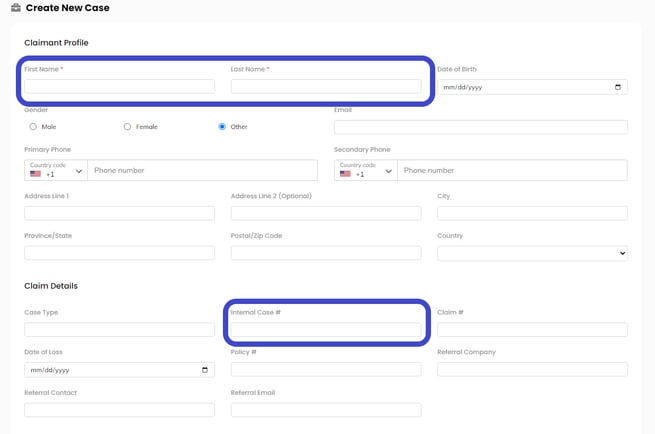
- Click ‘Create Case’ on the top-right corner

- You will receive a warning message if a case with the same Claimant Name and Internal Case ID already exists
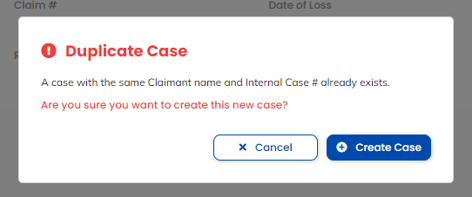
Note: You can still proceed to create the case if you wish. Click ‘Continue’ on the warning message to continue creating the case.