
Wisedocs allows clients to edit and customize their Doclists when conducting medical record reviews - removing irrelevant information or customizing the final output. Let's dive into how to clear lines.
How to Clear Lines
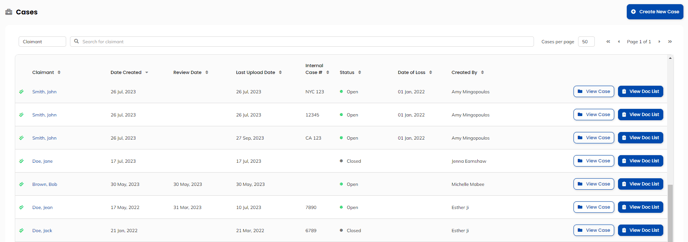
- Navigate to the "Cases" page, and select the case you would like to work on.
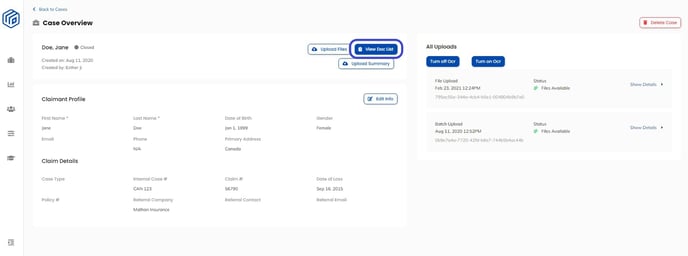
- In the "Case Overview" page, click on the "View Doc List" button to be taken to your doclist.

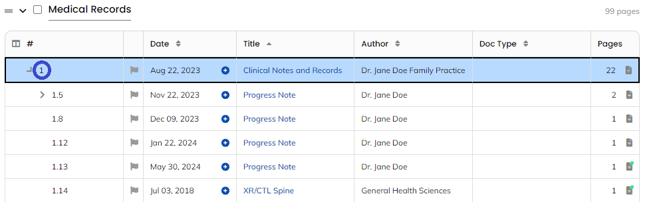
- Click the line number of the line you want to clear to select it.
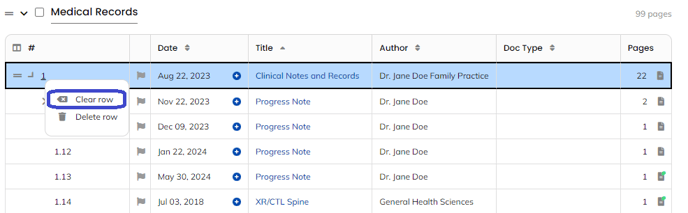
- Right-click the line number, and select “Clear row”
Pro feature:
To minimize the need for manual indexing, consider upgrading to our Pro-feature Automated Workflows to streamline your process. With automatic workflows, you can efficiently manage repetitive tasks, remove indexing after review, and shorten the table of contents in the final output.
If you'd like to upgrade to Automated Workflows, please contact your customer success manager today.