
Wisedocs has a new premium feature that allows clients to easily search their Master Doc List to highlight pages with mentions of a different claimant in the case files.
*Note this is a PRO feature. Please talk to Wisedocs at help@wisedocs.com if you are interested in upgrading to this feature.
How do I use the Incorrect Claimant feature?
- View your Doc List through the Case Overview page.

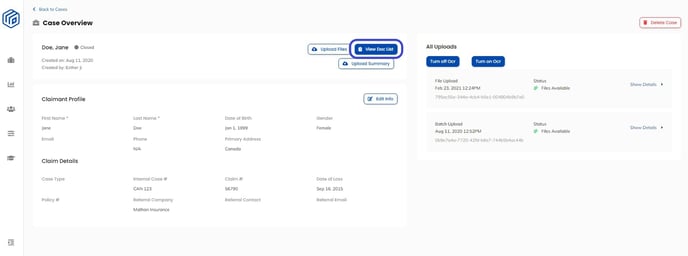
- Select "Entire Doc List" on the Master Doc List to run the feature on all the case files.

- Click the "Incorrect Claimant" button
 to run the feature. This will detect all pages within your case with the mention of a different claimant than the claimant listed on the case file.
- Example: if your claimant in your case is Jane Doe, the Incorrect Claimant feature will highlight all pages that mention the claimant John Smith.
- The documents with mention of the incorrect claimant will appear highlighted and selected in red.
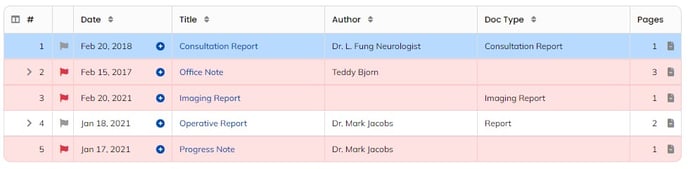
- To remove these files, click the "Delete" button
 , located in the toolbar. This will automatically create a new Doc List without the incorrect claimant case files, effectively deleting the incorrect claimant from the Doc List.
- These Incorrect Claimant files will still be available in the Master Doc List.
- These Incorrect Claimant files will still be available in the Master Doc List.
- A pop up will appear, select "Delete"
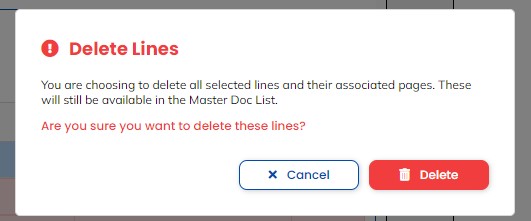
- The new Doc List without any Incorrect Claimant files will be created automatically.
See below for a demo:

Important to Note:
- You are able to run the Wrong Claimant feature only on the Master Doc List.
- This feature only applies to new cases that have been uploaded and does not work retroactively on previous case files, unless new case files have been uploaded to the claim case.
- If you do not upload new case files to older cases, this feature will be unable to run and detect incorrect claimants.
- If you are interested in this feature and wish to learn more about pricing, please contact us at help@wisedocs.com.
See below for a video demonstration by our Customer Success team: